OpenClaw <> ContextSDK: AI Agents That Know You’re Walking
AI agents are becoming the interface to our digital lives - but they’re still context-blind. By connecting ContextSDK to OpenClaw, we built an adaptive AI that understands how you’re moving through the world and adjusts execution in real time. Walking? Digest. Driving? Urgent only. Desk? Full interaction.



Introduction
AI agents are getting smarter every week.
But they still behave as if you are always sitting calmly at a desk.
They don’t know if you're walking with your phone in your pocket, lying on the couch or actively focused at your desk. They treat every moment the same way.
We wanted to change that.
So Felix built a working prototype that connects ContextSDK (real-world mobile context - motion, attention, environment) to OpenClaw (a personal AI assistant running on your own computer).
The result: an AI agent that automatically adapts how it communicates and executes tasks based on what you're physically doing.
Walking? Voice messages and batched digests.
At your desk? Detailed text and interactive mode.
Driving? Urgent alerts only.
No manual toggling. It just works.

What we built
OpenClaw is a personal AI assistant that runs locally on your computer. It handles tasks, reminders, communications and workflows on your behalf.
The limitation of any AI assistant today is simple: it has no awareness of your physical world.
It doesn’t know if you are:
- walking
- in transit
- focused at a desk
- hands-free
- low attention
So it defaults to a single interaction model.
ContextSDK changes that.
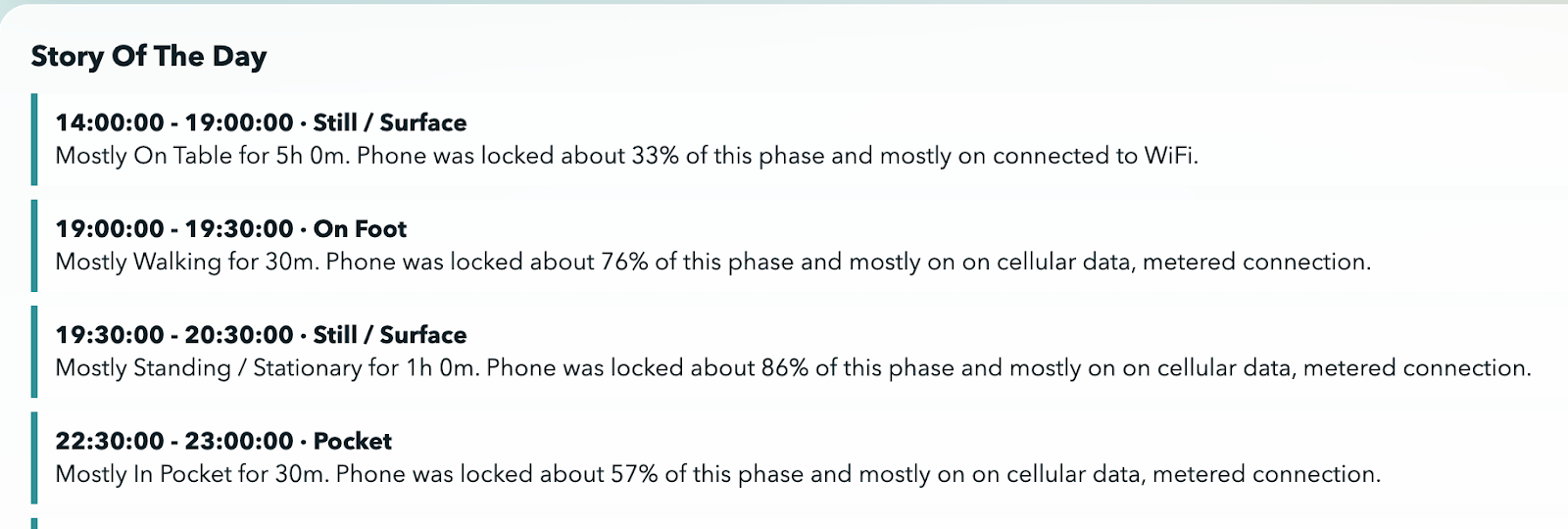
Running as a companion app on iPhone with background processing enabled, ContextSDK continuously understands real-world context: mobility state, attention level and environment signals.
Through a native plugin architecture, this structured context is injected directly into OpenClaw’s runtime.
The integration means OpenClaw doesn’t just know what to do for you.
It knows how and when to reach you.

Throughout the day, interaction expectations shift dramatically. An AI agent should shift with them.
How it works
Architecture overview
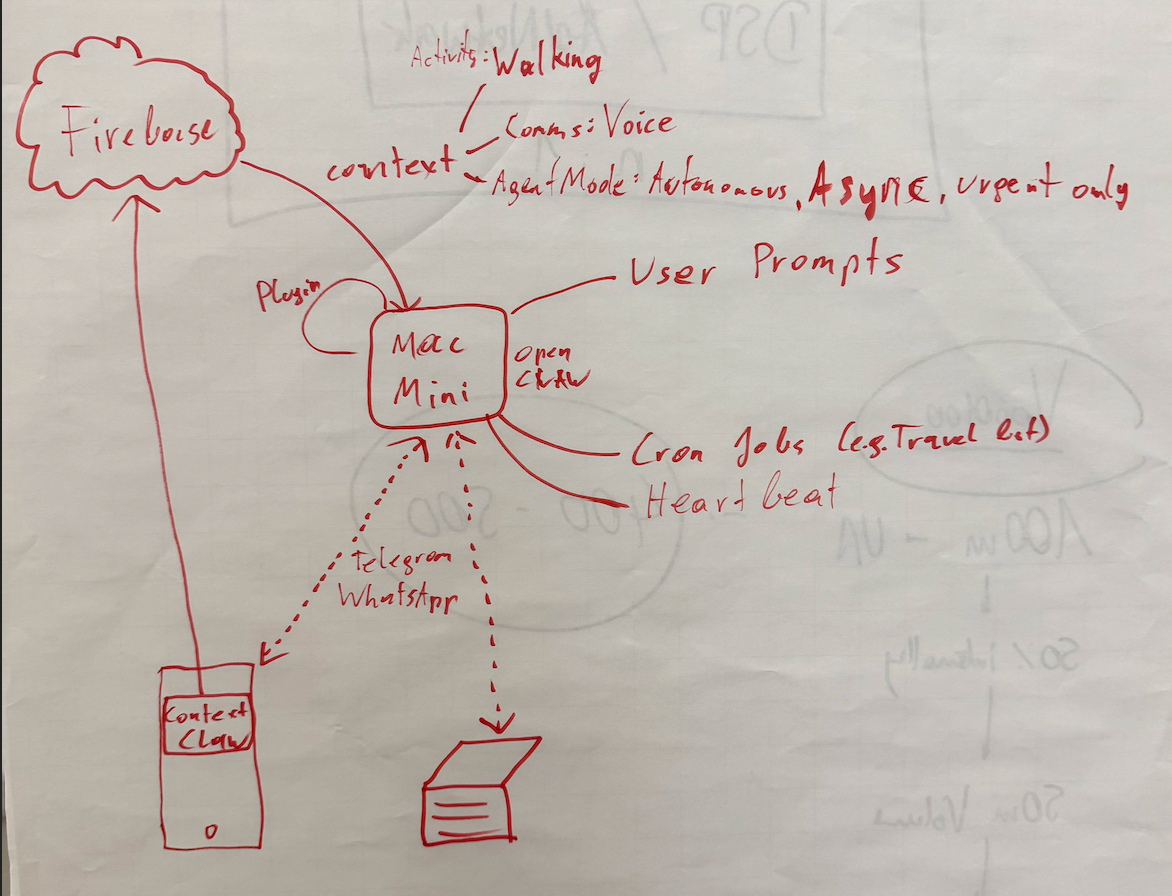
The integration is implemented as an OpenClaw plugin that subscribes to context changes from ContextSDK.
The flow works as follows:
- Mobile Companion App: The user installs a companion app on their iPhone with background processing enabled. ContextSDK runs continuously in the background, analyzing device sensors to understand the user's real-world context (motion, environment, attention availability).
- Context Change Detection: When the user's context changes (e.g., they start walking, sit down at a desk, get in a car), the plugin detects this shift.
- System Message Injection: On context change, the plugin injects a structured system message into OpenClaw. This message contains the full context profile - activity type, delivery preferences, execution mode and urgency routing rules.
- Universal Accessibility: Once injected, this system message is accessible to every part of OpenClaw - any cron job, user prompt, heartbeat or sub-agent. The entire system becomes context-aware without any component needing direct integration with ContextSDK.
What context gets injected
The system message provides three layers of context-driven configuration:
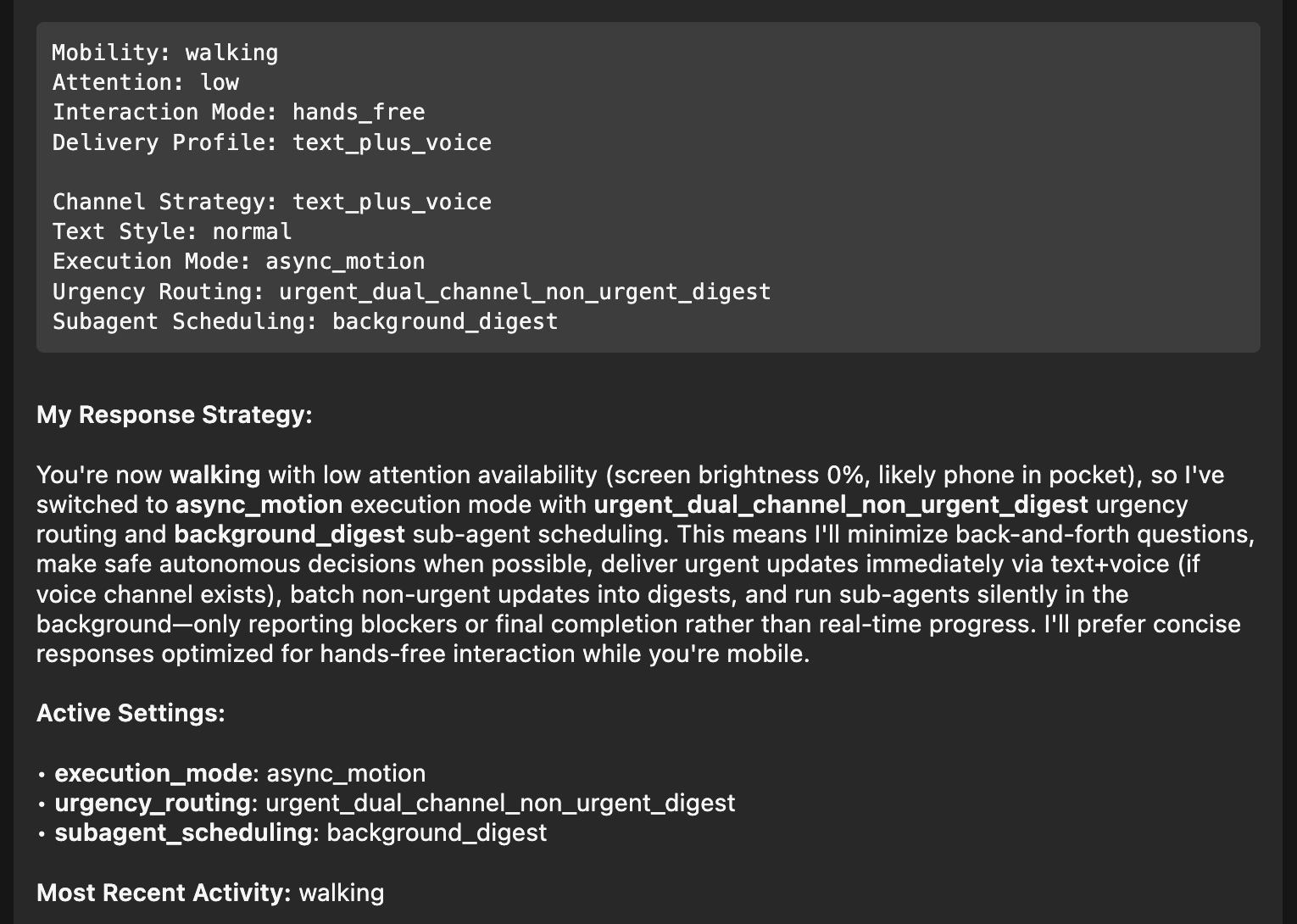
Example: Walking with low attention
When ContextSDK detects the user is walking (phone likely in pocket, screen brightness at 0%, low attention), the injected context triggers the following behavior:
Detected Context: Mobility: walking | Attention: low | Interaction Mode: hands_free Delivery Profile: text_plus_voice
Resulting Agent Behavior: Execution Mode: async_motion | Urgency: urgent_dual_channel_non_urgent_digest Sub-agent Scheduling: background_digest
In practice this means:
- urgent updates delivered immediately
- non-urgent items batched
- minimal back-and-forth
- concise responses optimized for hands-free use
- safe autonomous decisions where possible
When the user returns to a desk environment, OpenClaw automatically switches back to full interactive mode with detailed text-based communication.
The agent doesn’t just detect context.It adapts execution.
Why this matters
Every AI assistant today is context-blind about the physical world. They don’t know if you’re walking with your phone in your pocket, lying in bed or actively focused at your desk. As a result, they treat every moment the same way.
That creates a disconnect:
- walls of text while you’re walking
- interruptions while you’re driving
- silence when you actually have time to engage
This is more than a UX annoyance.
AI agents are quickly becoming the primary interface to our digital lives. Instead of opening apps, we increasingly delegate tasks directly to agents.
Peter Steinberger recently predicted that most apps will disappear in the age of AI agents. His argument is that many apps simply manage data and agents can handle that more naturally.
If that shift happens, agents don’t just assist apps. They replace them.
And if agents replace apps, they must understand timing.
An interface without awareness of physical context will always feel misaligned.
Without context:
- agents interrupt at the wrong moment
- overload low-attention situations
- underperform in high-focus states
With context: agents adapt.
This prototype shows that real-world context can become a native input to AI systems - not as a feature, but as infrastructure.
How we built this prototype
We built the integration as a native OpenClaw plugin that subscribes to ContextSDK context change events.
When a context change occurs, the plugin constructs a structured system message and injects it into the OpenClaw runtime.
From that point forward:
Every cron job, heartbeat, user prompt and sub-agent has access to the current context automatically.
The prototype runs on:
- Mac Mini hosting OpenClaw
- iPhone running the ContextSDK companion app
Walk away from your desk and the agent shifts behavior within seconds.
This is not theoretical.
It works end-to-end today.
We believe this is only the beginning of what context-adaptive AI can enable.
→ If you’d like to see it in action, watch our live demo of the OpenClaw × ContextSDK integration.
Get involved
We're looking for ideas, collaborators and early adopters. If you're building with AI agents and want context-awareness baked in, or if you see applications for this technology that we haven't thought of yet, we'd love to hear from you via dieter@contextsdk.com.
Reach out - let's explore what's possible.